Konstella
- UX Research Project
- Google Workspace
- San Francisco, CA
This UX research portfolio piece explores the end-to-end experience of users interacting with the Konstella App, a communication platform designed for parents, teachers, and school administrators. Konstella aims to simplify school-related communication by offering tools for messaging, event coordination, and parent engagement within a centralized digital space.

Konstella
- UX Research Project
- Google Workspace
- San Francisco, CA
This UX research portfolio piece explores the end-to-end experience of users interacting with the Konstella App, a communication platform designed for parents, teachers, and school administrators. Konstella aims to simplify school-related communication by offering tools for messaging, event coordination, and parent engagement within a centralized digital space.
Konstella
- UX Research Project
- Google Workspace
- San Francisco, CA
This UX research portfolio piece explores the end-to-end experience of users interacting with the Konstella App, a communication platform designed for parents, teachers, and school administrators. Konstella aims to simplify school-related communication by offering tools for messaging, event coordination, and parent engagement within a centralized digital space.
Overview and Research Goals
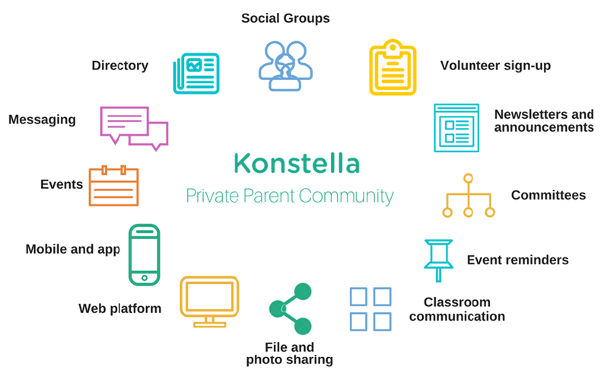
Konstella is a private communication platform designed to help parents, teachers, and school administrators stay connected and organized within a school community. It offers features like classroom and school-wide messaging, event coordination, parent directories, and centralized calendars with reminders. Parents can join interest-based groups, sign up for volunteer opportunities, and stay informed about school happenings—all within a single app. However, Konstella is only functional if a school has officially adopted the platform, meaning its value depends entirely on active school-wide participation.
The purpose of this research project is to evaluate the end-to-end experience of Konstella users as they interact with the Konstella app focusing on how well it supports users in achieving their goals. Specifically, the study sought to answer several key research questions: How effectively does the app support users’ ability to complete essential tasks? How does the app’s structure and organization impact task completion? Do users understand the app’s content, and does it aid in accomplishing their objectives? Additionally, the research explored users’ impressions of the app’s visual design and their overall perceptions of the platform. These questions provided a framework for assessing both the functionality and the usability of Konstella from the users’ perspective. While Konstella offers a range of features designed to streamline school communication and community engagement, its effectiveness ultimately depends on how well parents and teachers can navigate and use the platform in real-world contexts.
Initial Research
The first step in this UX research journey was to understand users’ perceptions and sentiment about the Konstella app. To gather broad, initial insights, I conducted a survey targeting active users of the app. The survey focused on uncovering first impressions, usage patterns, usability, and overall satisfaction. Key questions included: What was your first impression of the Konstella App?, How often do you use it during the week?, and How easy is it to use? To identify which features users value most, respondents were also asked: What functionality of the app could you not live without? and What is the most difficult part of using it? The survey also explored user satisfaction across several areas: app stability, security, visual design, and overall quality. Finally, participants were invited to suggest changes and give the app a score out of 10. These responses helped shape a clearer picture of how users experience Konstella on a day-to-day basis and pointed to areas requiring deeper exploration.
Konstella App Initial Survey
Explore the survey that was used to understand how users feel about the Konstella app.
Open the surveyKonstella App Initial Survey
Explore the survey that was used to understand how users feel about the Konstella app.
Open the surveyMajor Findings
The Konstella app was found to be useful for keeping parents informed and connected within the school community, with features such as announcements, event sign-ups, the Parent Directory, Private Messaging, and the Classroom section being especially valued for facilitating communication. However, the app was reported to lack integration, as several tasks—such as creating events or sign-ups—can only be completed on a computer, reducing convenience. Users also indicated a need for improved calendar synchronization and more flexible notification options. In addition, the interface was described as confusing and overwhelming, with limited filtering options in the feed and challenges in managing multiple schools. A desire for greater customization to tailor the app to individual preferences was also expressed.
Implications
The findings suggest that while the Konstella app successfully meets users’ core needs for communication and community engagement, several design and functionality limitations are hindering overall user satisfaction and long-term adoption. The lack of full mobile integration implies that users may experience frustration or disengagement when key tasks cannot be completed on their preferred device. Similarly, the absence of calendar synchronization and customizable notification settings suggests missed opportunities to align the app with users’ daily digital habits. The confusing interface and lack of filtering options indicate usability challenges that could discourage frequent use and reduce the effectiveness of communication within the school community. Finally, the expressed need for greater personalization highlights an opportunity for Konstella to improve user retention by offering more flexible, user-centered design solutions that accommodate diverse preferences and multi-school management needs.
Useful

“Messaging and directory are everything for me.”
Integration

“It’s more difficult to access administrator-level functionality on the app.”
Confusing UI

“I can’t easily find my sign ups, I need to check the calendar day by day.”
Useful
“Messaging and directory are everything for me.”
Integration
“It’s more difficult to access administrator-level functionality on the app.”
Confusing UI
“I can’t easily find my sign ups, I need to check the calendar day by day.”
Research Plan and Execution
After the initial exploratory research was completed, the first step was to develop a usability research plan to guide the project. This plan outlined clear objectives, methods, and metrics for evaluating the Konstella app’s user experience. It focused on identifying pain points related to navigation, task completion, and feature accessibility across devices. The plan incorporated user interviews, task-based testing, and heuristic evaluations to gather both qualitative and quantitative insights. This structured approach ensured that the research aligned with user needs and generated actionable findings to inform design improvements.
The second step involved executing the UX research study. Recruitment began with an outreach email inviting potential participants to join the usability study. Interested individuals were directed to a usability test screener to confirm they met the target audience criteria. Selected participants then received a confirmation email outlining the study schedule, format, and expectations. They were also provided with a consent form explaining the purpose of the study, participant rights, and data privacy considerations, which they were required to acknowledge before participating. This end-to-end process ensured that qualified, engaged, and well-informed participants took part in the study.
The final step was to develop the analysis plan, structured to offer both a high-level overview and a detailed examination of the research. It begins with an executive summary highlighting key insights and overarching themes. A more comprehensive section follows, detailing the methodology, participant profile, and evaluation scenarios used to assess core tasks. The results are presented through three primary metrics (task completion success rate, time on task, and user errors) providing a measurable view of user performance. The plan concludes with actionable recommendations and a set of conclusions that synthesize the overall user experience and highlight opportunities for improvement.
Research Plan
Get full access to the research plan and see how data-driven insights shaped this research.
Dive into the research planAnalysis Plan
See how research insights were transformed into actionable findings.
Dive into the analysis planResearch Plan
Get full access to the research plan and see how data-driven insights shaped this research.
Dive into the research planAnalysis Plan
See how research insights were transformed into actionable findings.
Dive into the analysis planResearch Plan
Get full access to the research plan and see how data-driven insights shaped this research.
Dive into the research planAnalysis Plan
See how research insights were transformed into actionable findings.
Dive into the analysis planRecruitment Email
Access the complete recruitment email and explore how it set the foundation for a smooth and effective study.
Read recruitment emailUsability Test Screener
Explore the confirmation emails and learn how transparent communication improved participant engagement.
See participant screenerRecruitment Email
Access the complete recruitment email and explore how it set the foundation for a smooth and effective study.
Read recruitment emailUsability Test Screener
Explore the confirmation emails and learn how transparent communication improved participant engagement.
See participant screenerRecruitment Email
Access the complete recruitment email and explore how it set the foundation for a smooth and effective study.
Read recruitment emailUsability Test Screener
Explore the confirmation emails and learn how transparent communication improved participant engagement.
See participant screenerConfirmation Email
Get full access to the research plan and see how data-driven insights shaped this research.
Access in-person confirmation emailAccess remote confirmation emailParticipant Consent Form
Access the consent form and see how participant protection and clarity guided this study.
View in-person consent formView remote consent FormConfirmation Email
Get full access to the research plan and see how data-driven insights shaped this research.
Access in-person confirmation emailAccess remote confirmation emailParticipant Consent Form
Access the consent form and see how participant protection and clarity guided this study.
View in-person consent formView remote consent FormConfirmation Email
Get full access to the research plan and see how data-driven insights shaped this research.
Access in-person confirmation emailAccess remote confirmation emailParticipant Consent Form
Access the consent form and see how participant protection and clarity guided this study.
View in-person consent formView remote consent FormUsability Testing
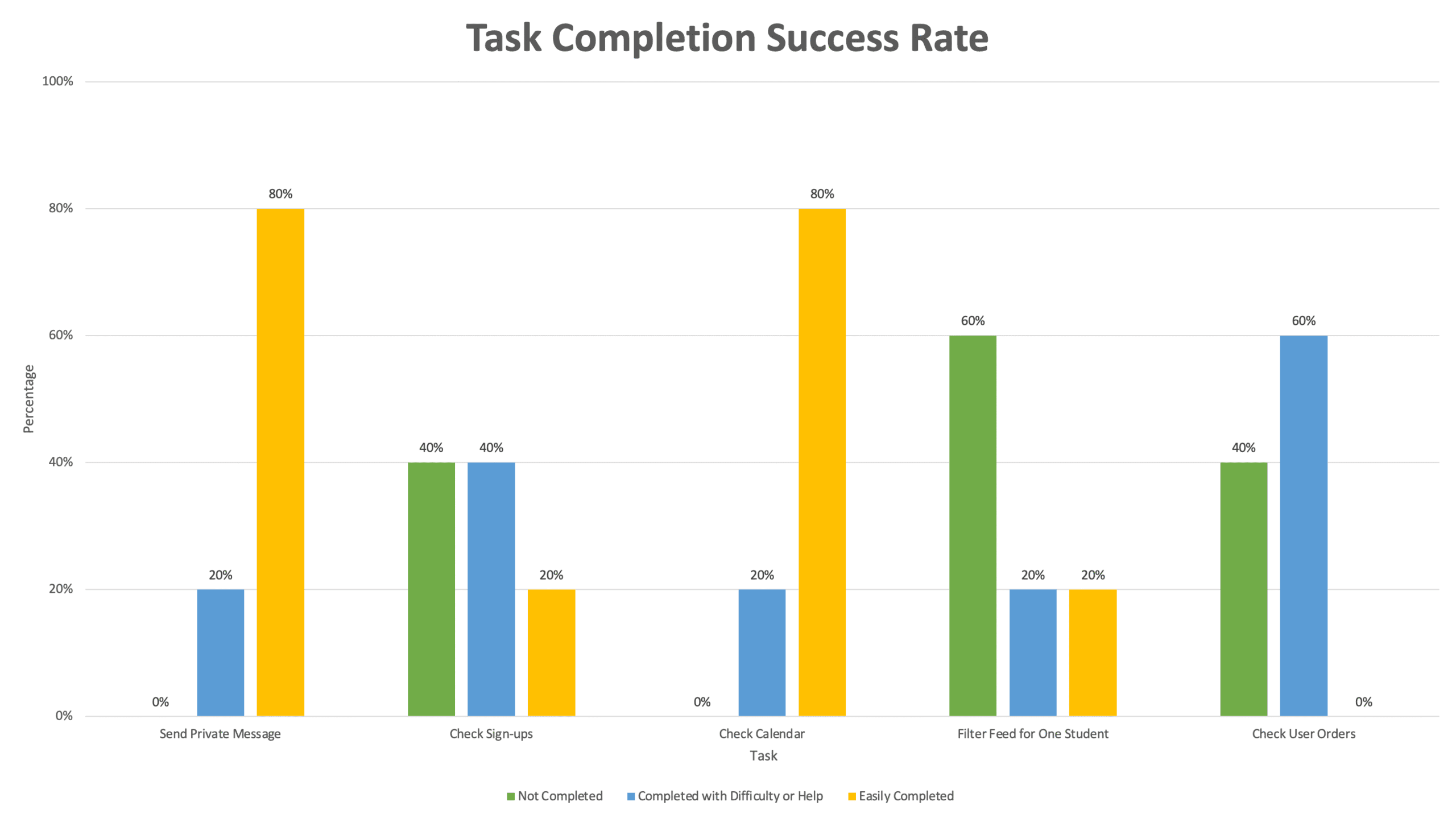
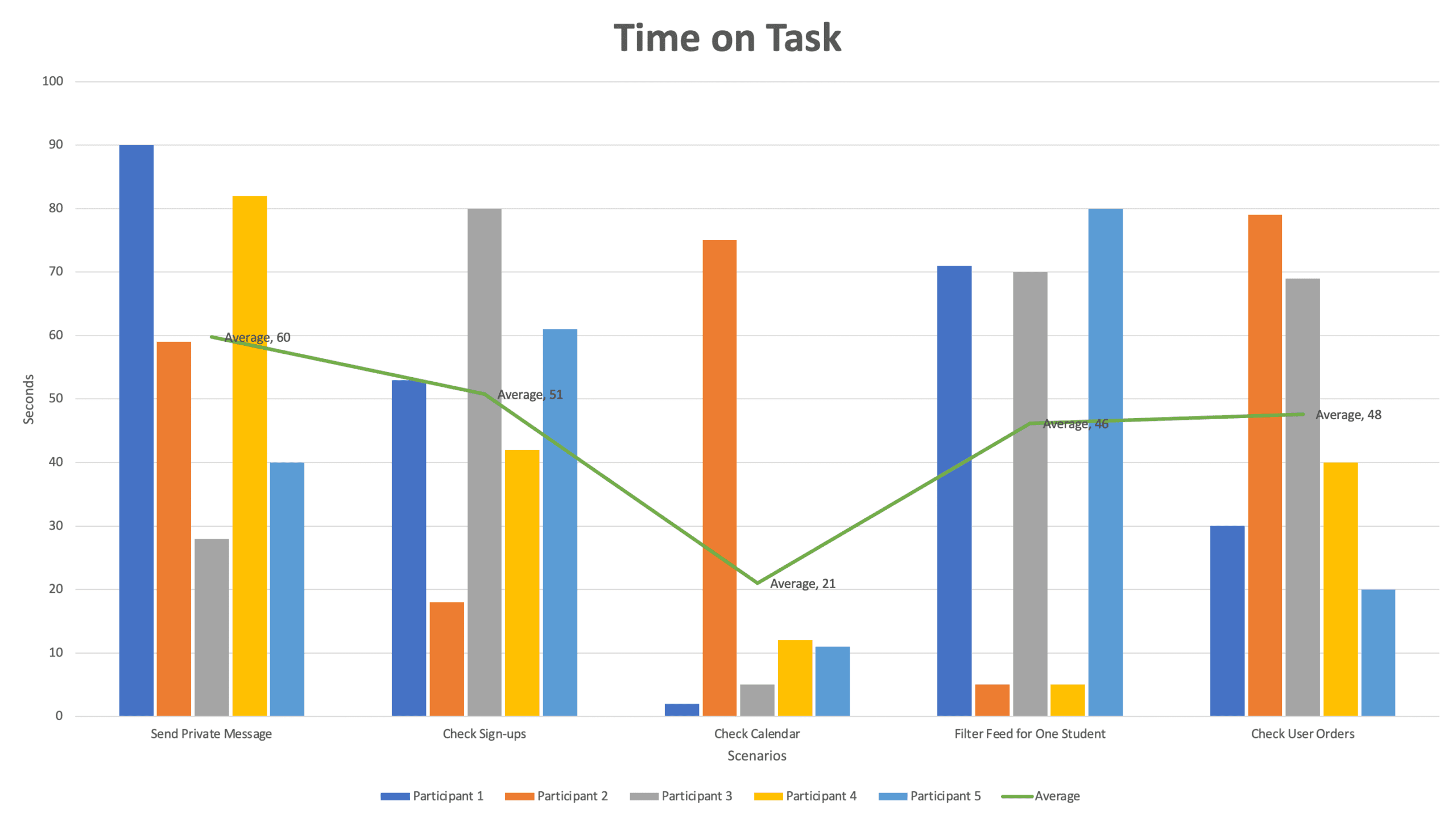
Five women between the ages of 32 and 45 participated in the usability tests. All were Konstella users, lived in the San Francisco Bay Area, and had at least completed college. Before each session, participants watched a short video based on the moderator guide to familiarize themselves with the study process and expectations. Sessions were recorded and conducted either in person or remotely via Zoom. A structured discussion guide directed the study, beginning with introductory questions, followed by task scenarios reflecting common app interactions (sending a private message, checking sign-ups, reviewing the school calendar, filtering the feed for a specific student, and reviewing user orders) and concluding with a debrief and participants’ final thoughts. After completing the tasks, each participant filled out a satisfaction questionnaire to provide feedback on their experience with Konstella.
Discussion Guide
See the exact prompts that guided each participant’s journey.
Review discussion guideDiscussion Guide
See the exact prompts that guided each participant’s journey.
Review discussion guideDiscussion Guide
See the exact prompts that guided each participant’s journey.
Review discussion guideSatisfaction Questionnaire
Discover the questions that revealed what users really thought about Konstella app.
Open satisfaction questionnaireSatisfaction Questionnaire
Discover the questions that revealed what users really thought about Konstella app.
Open satisfaction questionnaireMetrics
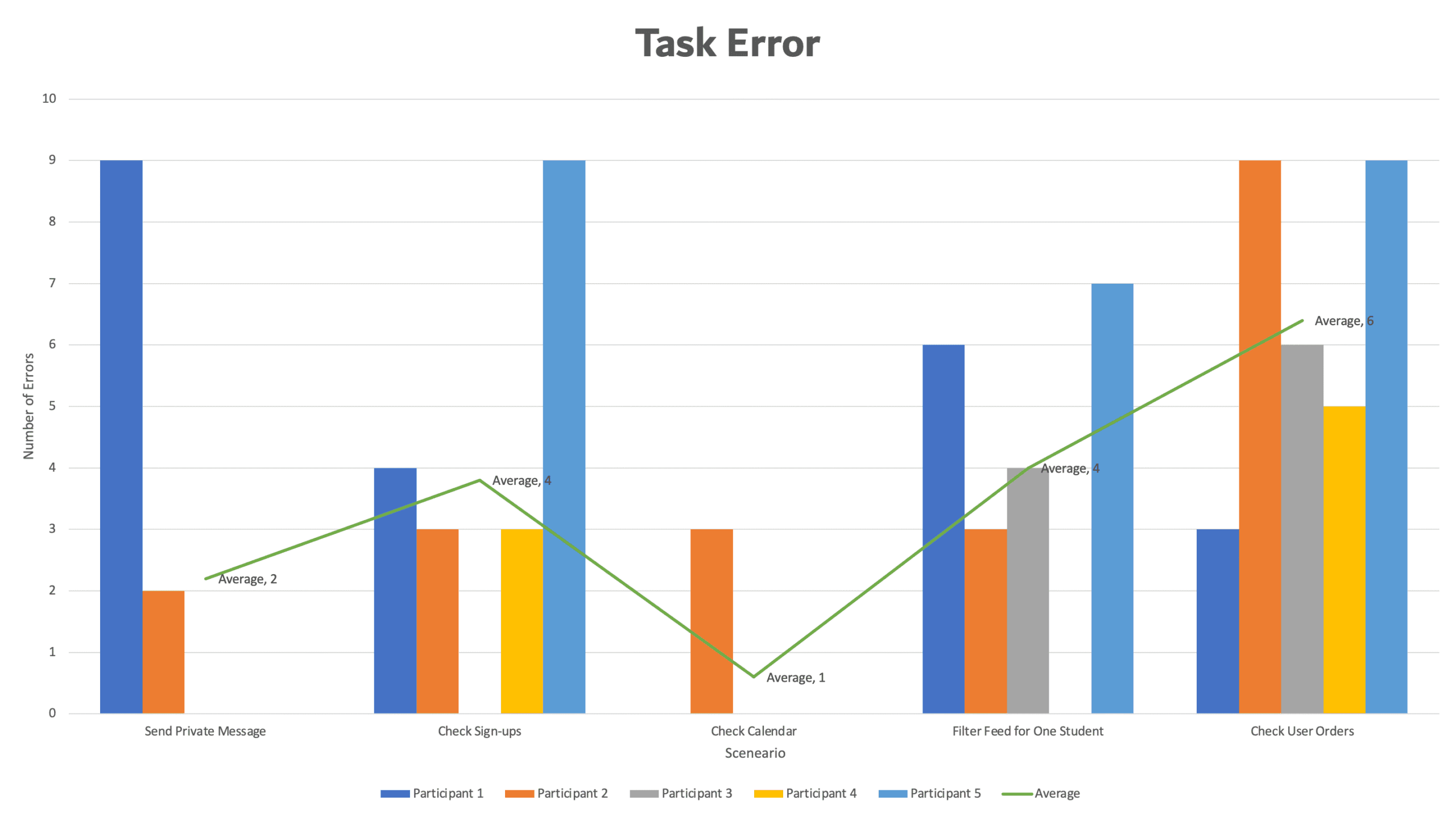
The usability study generated quantitative metrics that provided insights into the app’s effectiveness and ease of use. Task Completion Success Rate measured whether participants were able to achieve the goal of each scenario, indicating how well users could complete common tasks. Time on Task (TOT) tracked how long participants took to complete each scenario, highlighting areas that were more complex or confusing. Task Errors were recorded to identify points where users struggled or made mistakes, helping to pinpoint usability issues that could be addressed in future design iterations.
Mayor Findings
The research revealed three major findings centered around the parent directory, help guides, and overall UI. Participants expressed enthusiasm about having a parent directory, noting that it helps them easily connect with other parents. However, they also shared that the app’s learning curve is challenging due to limited guidance, many users were unsure about menu options or how to complete certain tasks. Lastly, participants struggled to interpret various UI elements, and all agreed that the feed felt cluttered and difficult to navigate.
Parent Directory
“I like to have a place to find emails or phone numbers. It’s good to connect parents.”
Help Guides
“There is also no guide, I had to play around the app to learn how to use it. Where is the help?”
Confusing UI
“What is the meaning of this icon? For me, this is an LGBTQ flag, not a filter.”
Parent Directory
“I like to have a place to find emails or phone numbers. It’s good to connect parents.”
Help Guides
“There is also no guide, I had to play around the app to learn how to use it. Where is the help?”
Confusing UI
“What is the meaning of this icon? For me, this is an LGBTQ flag, not a filter.”
Recommendations
Based on the research findings, three key recommendations emerge. First, the app’s navigation should be improved to reduce the time users spend completing basic tasks and streamline common pathways. Second, the user interface requires refinement, with a focus on enhancing visual elements and clarifying text to make interactions more intuitive. Finally, the inclusion of user guides should be considered, as providing clear instructions and support would significantly enhance the overall user experience.
Navigation
“It’s so messy and it makes me want to use the website instead. Is this clickable? What is this image for?”
UI
“It’s so messy and it makes me want to use the website instead. Is this clickable? What is this image for?”
Tutorials
“I learned something new from clicking here. Now I know how to use the filter.”
Navigation
“It’s so messy and it makes me want to use the website instead. Is this clickable? What is this image for?”
UI
“It’s so messy and it makes me want to use the website instead. Is this clickable? What is this image for?”
Tutorials
“I learned something new from clicking here. Now I know how to use the filter.”
Satisfaction Survey
After completing the usability tests, participants were asked to fill out a satisfaction survey to capture their impressions of the Konstella app. Overall, participants found the app to be useful and valuable for connecting with other parents. However, they also reported that the app can feel intimidating and confusing, particularly due to the lack of user guides, which can leave users feeling overwhelmed. These insights highlight opportunities to improve both usability and user support to enhance the overall experience.
Useful
“The app isn’t as user friendly as using the desktop but it’s a great tool to contact parents.”
Customization
“I wish there was a way to personalize it based on my needs or interests.”
UI Confusing
“I think at the beginning is a little confusing to use and sometimes you can feel overwhelmed.”
Useful
“The app isn’t as user friendly as using the desktop but it’s a great tool to contact parents.”
Customization
“I wish there was a way to personalize it based on my needs or interests.”
UI Confusing
“I think at the beginning is a little confusing to use and sometimes you can feel overwhelmed.”
How to Make it Better?
Improving the UX research for the Konstella app requires a comprehensive approach that ensures insights are both actionable and user-centered. This includes incorporating accessibility to reflect the needs of users with diverse abilities, integrating iterative testing to continuously refine and validate design decisions, leveraging eye-tracking to understand how users visually interact with the app, and engaging stakeholders to align research with business goals and translate findings into meaningful product improvements. Below, you can find a detailed explanation of each of these strategies and how they contributed to enhancing the Konstella user experience.
Accesibility Tools & Resources
As part of future improvements, the Konstella app could benefit from incorporating dedicated accessibility testing tools to ensure a more inclusive user experience. One option could be BrowserStack App Accessibility Testing, a cloud-based platform that allows testing on real iOS and Android devices. BrowserStack automatically identifies WCAG-related issues, such as missing labels, insufficient contrast, and small touch targets, through its Spectra rule engine. Additionally, it supports real screen-reader testing with both TalkBack and VoiceOver, providing more accurate insight into how users with assistive technologies navigate the app. Its seamless integration with CI/CD pipelines also enables teams to automate accessibility checks, helping maintain accessibility standards throughout ongoing development.
Another way to strengthen accessibility within UX Research is to intentionally plan for future usability testing sessions that include a diverse range of users with different access needs. This means recruiting participants with a variety of impairment types—such as visual (blindness, low vision, color blindness), motor or dexterity limitations, cognitive differences, and hearing impairments—to ensure the product is evaluated from multiple perspectives. Rather than asking participants to identify their disability, a more inclusive approach is to ask about their access needs or the assistive technologies they use, such as screen readers or magnifiers, as recommended by UXcel. It is equally important to confirm each participant’s devices, software, and settings beforehand to avoid unexpected barriers and ensure the session runs smoothly. For example, I once met a mother at school with significant vision impairment who struggled to read school announcements and had to rely on her husband for information—users like her must be intentionally included in the research process so their needs are fully understood and represented.
Iterative Testing Plan
An iterative testing plan ensures continuous improvement throughout the design process by evaluating the product in multiple rounds, refining it based on insights, and validating changes with users. Each cycle focuses on specific goals—starting with low-fidelity prototypes to test core concepts and user flows, then gradually increasing fidelity as the design matures. After each usability round, findings are synthesized, prioritized, and integrated into the next version of the prototype, allowing teams to quickly resolve issues before they become costly. This approach not only strengthens usability but also incorporates diverse perspectives early and often, ensuring the product evolves with user needs in mind. By repeating the cycle of testing, learning, and improving, iterative testing leads to more intuitive, accessible, and user-centered experiences.
Iterative Testing Plan
Uncover the evolution of the design through iterative testing.
Explore the iterative testing planIterative Testing Plan
Uncover the evolution of the design through iterative testing.
Explore the iterative testing planEye-tracking Plan
Incorporating eye-tracking into the usability testing of the Konstella app would provide deeper insight into how users visually interact with the feed layout and key interface elements. Heat map visualizations would reveal which areas of the screen attract the most attention, helping identify whether important components are being noticed or overlooked. Gaze plot visualizations would show the specific buttons, icons, and text users focus on, as well as patterns of repeated attention that may indicate confusion or strong relevance. Additionally, gaze replay visualizations would allow the moderator to assess whether participants navigate the feed efficiently by relying on the appropriate visual cues—such as filters, buttons, and icons—while completing tasks. Together, these eye-tracking methods would enhance the understanding of user behavior, highlight opportunities for design improvements, and support more evidence-driven decisions for optimizing the Konstella app experience.
Eye-tracking Plan
See how eye-tracking exposed hidden usability opportunities.
View the eye-tracking planEye-tracking Plan
See how eye-tracking exposed hidden usability opportunities.
View the eye-tracking planStakeholder Engagement
Engaging stakeholders in the UX research process for the Konstella app is essential to ensure alignment, buy-in, and impactful outcomes. Three key strategies were implemented to foster meaningful engagement. First, Collaboration: stakeholders were invited to participate in research sessions and provide feedback on iterative testing proposals, ensuring their perspectives were considered throughout the design process. Second, Communication: regular meetings and readouts were held to maintain transparency, share findings, and strengthen relationships. Third, Partnership: efforts were made to cultivate ongoing relationships between the UX research team and individuals across the organization, creating a foundation for continuous collaboration and shared understanding. Together, these approaches ensured that stakeholder engagement supported both research objectives and broader organizational goals.
UX Research & AI
Implementing AI in UX research can significantly enhance data collection, analysis, and insights generation, making the research process faster, more precise, and scalable. To effectively integrate AI into the UX process, the core principle is to combine AI and human insights: while AI excels at analyzing large datasets to identify patterns and anomalies, human researchers are essential for interpreting context, understanding emotional nuance, and generating actionable insights. A prudent strategy is to start small, initially automating focused tasks such as transcription, sentiment analysis, or generating heatmaps, and then gradually scaling up to more complex applications like predictive modeling as the team gains familiarity. Throughout this process, it is paramount to maintain ethics and privacy by ensuring participants are aware of AI usage and that all data is rigorously protected. Ultimately, the most significant impact comes from using AI iteratively, incorporating its capabilities across every phase of the UX workflow—from initial planning and research through to continuous monitoring and post-launch refinement—to establish a continuously smarter and more efficient design process.
Integrating AI into UX research, covering the full research lifecycle
Step 1: Define Research Goals & Metrics
AI Role: Assist in planning and hypothesis generation.
- Use AI tools to analyze existing user data (reviews, support tickets, analytics) to identify common pain points.
- Predict which areas of the product may need usability testing.
- Set measurable metrics such as task completion, error rate, time on task, and user satisfaction.
Step 2: Recruit & Screen Participants
AI Role: Automate and optimize participant selection.
- Use AI-driven survey or screener bots to pre-qualify participants.
- Analyze previous engagement or usage data to select participants representative of different user segments.
- Predict participant availability and likelihood of completing tasks based on behavior patterns.
Step 3: Data Collection
AI Role: Capture richer, larger-scale datasets efficiently.
- Usability sessions: Record sessions with AI transcription for interviews or think-aloud protocols.
- Behavior tracking: Implement AI tools to track clicks, scrolls, navigation paths, and heatmaps.
- Surveys & feedback: Use AI chatbots for adaptive surveys, adjusting questions in real time based on user responses.
- Emotion recognition: AI can analyze facial expressions or voice tone during testing (optional and ethical).
Step 4: Data Analysis
AI Role: Accelerate insights extraction and pattern recognition.
- Text analysis: NLP tools to analyze interview transcripts, open-ended survey responses, or support tickets.
- Sentiment analysis: Detect emotions, frustrations, or satisfaction from user feedback.
- Behavior pattern recognition: Cluster similar user behaviors and identify common UX pain points.
- Predictive modeling: Suggest likely usability issues before they occur in future tests.
Step 5: Insights & Recommendations
AI Role: Generate actionable insights and reports.
- Auto-generate visualizations: heatmaps, engagement graphs, task success metrics.
- Highlight the most frequent errors, confusing flows, and points of friction.
- Suggest design improvements based on predictive models and past patterns.
Step 6: Continuous Monitoring & Iteration
AI Role: Keep UX research ongoing and adaptive.
- Continuously track app usage, engagement, and satisfaction metrics.
- Monitor changes after design updates to see impact in real time.
- Use AI to simulate new flows and predict user response before releasing updates.
Finally, effectively integrating AI into UX research requires a balanced and thoughtful approach. Combining AI’s strength in analyzing large datasets with human expertise in interpreting context and emotions ensures insights are both accurate and meaningful. Starting with small, manageable applications—such as automated transcription, sentiment analysis, or heatmaps—allows teams to build confidence before scaling to predictive models. At the same time, maintaining ethical standards and protecting participant privacy is essential to fostering trust. Finally, by using AI iteratively across all phases of research—from planning and testing to continuous monitoring—UX teams can create a more intelligent, efficient, and user-centered design process.